
 kevin@skalia.ca


Email Warmup in 2026: Why and How to Warm Up a Domain
Just bought a domain for prospecting and your first emails are landing in spam? That's normal: without warmup, a new domain has zero reputation. Here's how to warm up a domain step by step, with a week-by-week schedule.
- Warming up a domain means gradually increasing sending volume to build a reputation and avoid spam filters.
- Allow 2 to 4 weeks before sending at scale.
- Set up SPF, DKIM, and DMARC first, and prospect from a secondary domain.
- The mistake that burns everything: sending 200 cold emails on day one.
What Is Email Warmup (Domain Warming)?
Warming up a domain means gradually increasing sending volume to build sender reputation and keep your emails out of spam. A new domain has zero history with Gmail, Outlook, or Yahoo. These providers are, by default, suspicious of an unknown sender that suddenly fires off dozens of messages.
The principle is simple: you first simulate normal activity (few emails, lots of replies), then ramp up volume week by week. Providers observe this behavior and assign a reputation to your domain and IP address.
In practice, warmup starts with a handful of daily sends to trusted inboxes that open, reply, and pull your emails out of spam. That positive signal trains the filters. Without it, you stay a suspicious sender.
Why Is Warmup Essential for Cold Email?
In cold email, warmup is essential because a cold domain lands almost systematically in spam or the Promotions tab. Your prospects don't know you, have never written to you, and aren't expecting you. To the filters, that's the textbook profile of a spammer.
Deliverability is the crux of the whole game. An email that's never read generates neither a reply nor a meeting, no matter how good your message is. Before you work on your hooks and follow-ups, you need to land in the inbox. Warmup is what makes everything else possible.
Two signals matter most to filters: engagement rate (opens, replies) and complaint rate (spam flags). A well-run warmup boosts the first and crushes the second. That's what lets you later send at volume without getting cut off.
If you're launching a campaign, read our cold email guide and our email prospecting method to frame the message before you hit send.
How Long Does It Take to Warm Up a Domain?
Warming up a domain generally takes 2 to 4 weeks before you can safely send at volume. A completely new domain needs more like 3 to 4 weeks. A domain that's already been used, with a clean history, can be ready in 2 weeks.
The duration depends on three factors: the age of the domain, the target volume, and how consistent the sending is. The more emails per day you want to send eventually, the more gradual the ramp-up needs to be. Trying to move fast is the surest way to break everything.
Patience pays off. A properly warmed domain holds up for months. A domain burned by rushing has to be replaced, with the warmup delay starting over from scratch.
How Do You Warm Up a Domain Week by Week?
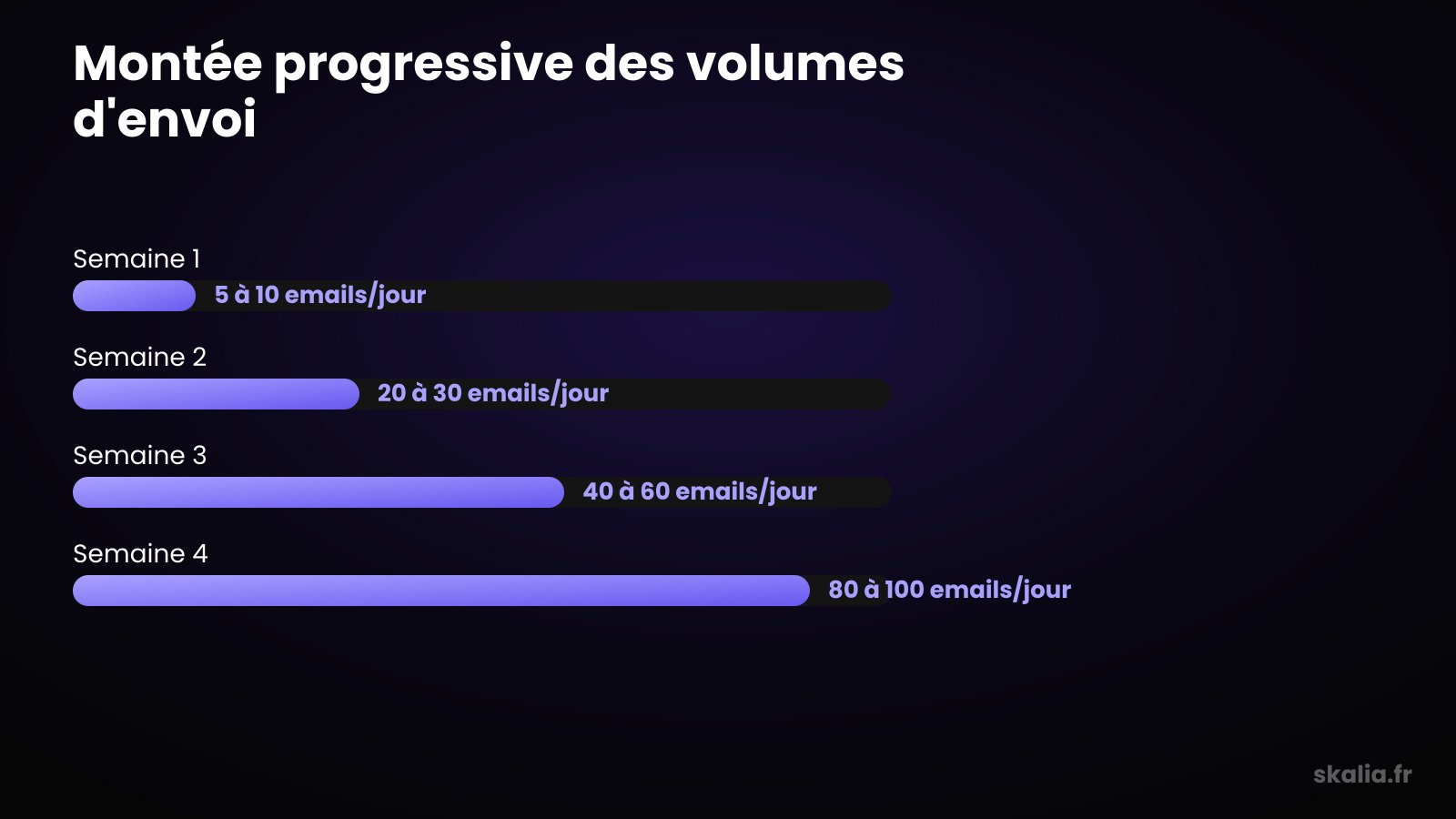
To warm up a domain, start at 5-10 emails a day, then double the volume each week until you reach 80-100 daily emails by week 4. This pace gives filters time to observe stable behavior and grant you their trust.
Here's a realistic warmup schedule for a new domain, before launching your real campaigns.
| Week | Volume/Day | Actions |
|---|---|---|
| Week 1 | 5 to 10 emails | Set up SPF, DKIM, DMARC; send to internal inboxes that reply |
| Week 2 | 20 to 30 emails | Add an automated warmup tool; vary the content |
| Week 3 | 40 to 60 emails | Introduce a few real, warm prospects; monitor deliverability |
| Week 4 | 80 to 100 emails | Launch cold campaigns; keep warmup running in the background |
Keep a buffer: never push a domain to 100% of its capacity. Keeping warmup running in the background, even during a live campaign, maintains reputation over the long haul.
What Tools Should You Use for Warmup?
Warmup tools automate sending and replying between network inboxes to simulate healthy activity. They place your emails within a network of accounts that open, reply to, and pull each other out of spam, all without manual effort on your part.
Most cold email platforms now include a built-in warmup module. You'll find them in our comparison of lemlist, Waalaxy, and La Growth Machine. These suites combine warmup, sequence sending, and deliverability tracking in a single tool.
On the data side, warmup is useless on a dirty list. Choose a verified email source first: our comparison of Apollo, Lusha, and Kaspr helps you pick a provider. An invalid email generates a bounce, and bounces weigh heavily on reputation.
What Best Practices Protect Your Domain?
The essential best practices are full authentication (SPF, DKIM, DMARC), using a secondary domain, and a gradual volume ramp-up. These three pillars prevent nearly all cold email deliverability problems.
Authenticate With SPF, DKIM, and DMARC
These three DNS records prove you're the authorized sender for the domain. Without them, Gmail and Outlook reject or downgrade your emails, warmed up or not. This is the first thing to configure, before your very first send.
Prospect From a Secondary Domain
Never use your main domain for cold email. Buy a close secondary domain (for example, get-yourbrand.com) and redirect it to your website. That way, if this domain gets burned, your official mailbox stays intact.
Ramp Up Volume Gradually
Double your volume at most from one week to the next, never more. Vary the content, personalize your sends, and monitor your metrics. A sudden spike is the number-one signal that triggers anti-spam filters.
What Mistakes Burn a Domain?
The mistake that burns a domain fastest is a mass send on day one, before any warmup. Going from zero to 200 cold emails in 24 hours immediately triggers filters and destroys your reputation, sometimes irreversibly.
Three other mistakes come up often. Sending to an unverified list, which multiplies bounces. Repeating an identical message to hundreds of addresses, which filters detect. And ignoring spam complaints without ever cleaning your database.
Watch your metrics closely. A bounce rate above 3%, or a rising complaint rate, should make you slow down immediately. To benchmark your results, compare them against our cold email and LinkedIn reply rate benchmarks.
FAQ
Can You Prospect Without Warming Up Your Domain?
Technically yes, but almost all your emails will land in spam. Without warmup, a new domain has no reputation and filters treat it as suspicious. You'll waste your prospect list on a very low inbox placement rate.
Do You Need to Warm Up an Older Domain?
Yes, but for less time. An older domain with a good history can be ready in 2 weeks instead of 4. However, if it's never been used to send emails, it remains unknown to filters and still needs a real warmup.
How Many Emails Per Day After Warmup?
After a full warmup, a domain comfortably handles 80 to 150 cold emails per day per inbox. To send more, add more inboxes and secondary domains rather than pushing a single address beyond its capacity.
Is Automated Warmup Enough on Its Own?
No. Automated warmup builds reputation, but it doesn't replace SPF/DKIM/DMARC authentication, a clean list, or a sensible volume ramp-up. It's one pillar among several, not a magic fix that excuses skipping best practices.
Warm Up Your Domain, Then Prospect Cleanly
Domain warmup isn't optional in cold email: it's the foundation of your deliverability. Two to four weeks of patience, clean authentication, and a gradual volume ramp-up are enough to avoid spam filters and get your campaigns off the ground.
At Skalia, we put these foundations in place before every prospecting campaign for our clients in Toulouse and beyond. If you want to industrialize the whole process, our automated prospecting guide covers the full chain, from a warmed-up domain to a qualified meeting. Let's talk.