
 kevin@skalia.ca


How Many LinkedIn Messages Per Day Before You Get Banned? 2026 Limits
In 2026, the safe limit sits around 20-30 invitations and 30-50 messages per day, spread throughout the day, with a gradual ramp-up for an account that has never done outreach before. LinkedIn doesn't publish official quotas and adjusts them based on each account's behavior: here are the observed ranges, the warning signs, and the practices that protect your profile.
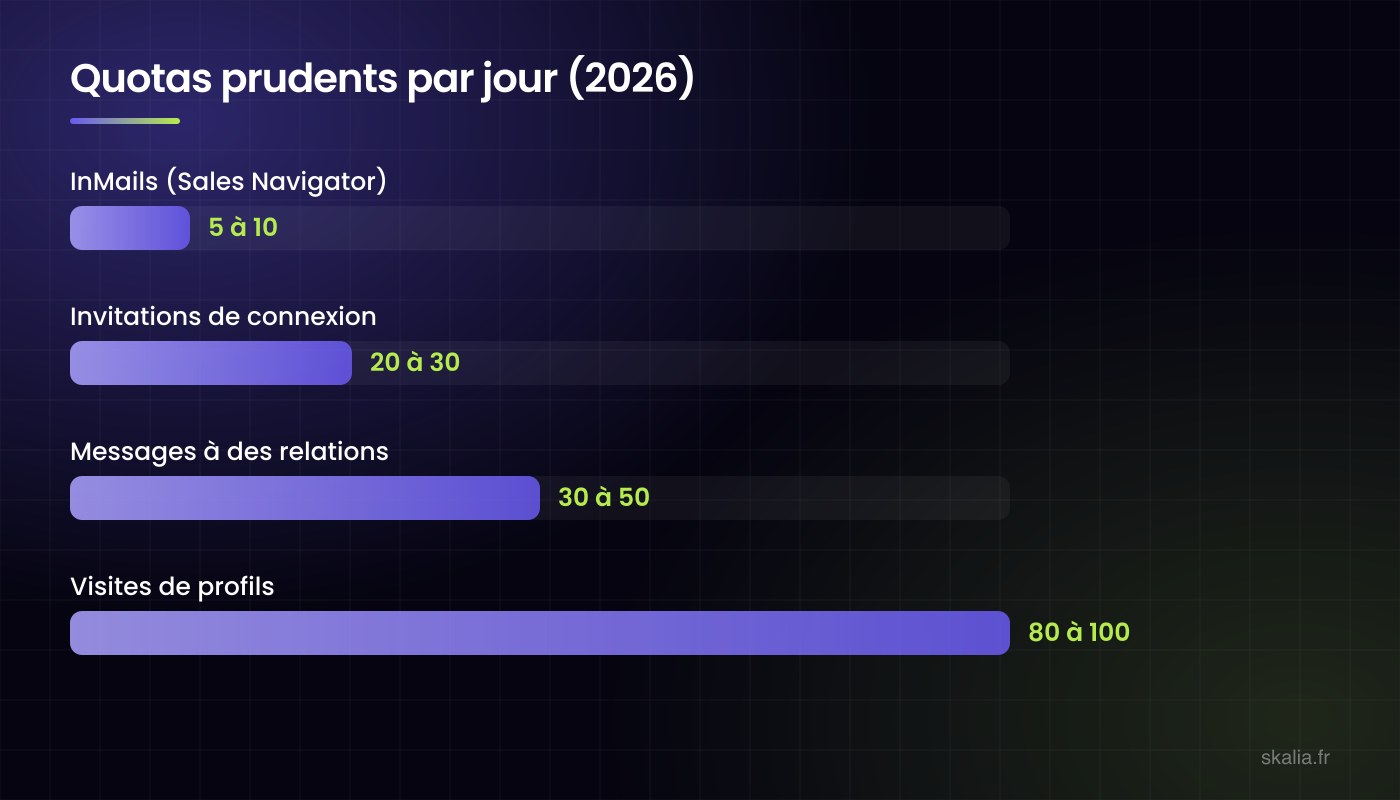
- Safe 2026 ranges: 20-30 invitations/day
- 30-50 messages/day
- 80-100 profile visits/day
- 100-150 invitations/week.
- Gradual ramp-up over 2-3 weeks for a new account starting outreach.
- Acceptance rate matters as much as volume: below 30%, LinkedIn throttles you.
- Send throughout the day, never in bursts.
What are LinkedIn's limits in 2026?
LinkedIn doesn't publish official quotas: the platform adjusts its thresholds based on account age, activity, and the perceived quality of your outreach. The ranges below are the cautious benchmarks observed in 2026 on healthy accounts.
| Action | Per day (safe) | Per week (safe) |
|---|---|---|
| Connection invitations | 20-30 | 100-150 |
| Messages to connections | 30-50 | 200-250 |
| Profile visits | 80-100 | about 500 |
| InMails (Sales Navigator) | 5-10 | based on credits (about 50) |
These thresholds aren't guaranteed rights: a recent, low-activity account, or one whose invitations are largely ignored, will get restricted well before reaching them. Conversely, an older account with a strong acceptance rate has more room to work with.
Why does acceptance rate matter as much as volume?
Because it's the main signal LinkedIn tracks. A high number of ignored or declined invitations signals spam-like behavior: the platform then throttles the account, even if it's under quota. The practical rule: keep your acceptance rate above 30%. Below that, pushing more volume won't help, it's the targeting that needs fixing first.
How do you ramp up without triggering the platform's alarms?
An account that jumps from 0 to 30 invitations a day overnight sets off red flags. The standard ramp-up: week 1, 5-10 invitations per day; week 2, 10-20; week 3, cruising speed at 20-30. Same logic applies to messages. And in every case: send throughout business hours at irregular intervals, never 30 actions in 10 minutes. Good automation tools handle this pacing natively; it's one of the key criteria covered in our LinkedIn outreach method.
What are the warning signs, and what should you do?
First level: LinkedIn shows a warning or asks for verification (captcha, email). Second level: temporary restriction on invitations, usually 1-4 weeks. Third level, rare but real: account suspension for using non-compliant tools or repeat offenses.
If you're restricted: stop all automation immediately, let the account rest for one to two weeks with normal usage (browsing, a few manual interactions), then resume well below your previous volumes. Also clear out old pending invitations (more than 3-4 weeks): a large backlog of ignored invitations weighs on your internal reputation score.
Key takeaways
- Stay under 20-30 invitations and 30-50 messages per day, spread throughout the day.
- Ramp up over 2-3 weeks with a new account starting outreach.
- Watch your acceptance rate: above 30% you're in good shape, below that, fix your targeting.
- If restricted: stop completely, pause, then ease back in gently. Never force it.
FAQ: LinkedIn quotas
Are the limits different with Sales Navigator?
Sales Navigator adds InMails and better filters, but doesn't multiply the standard invitation and messaging quotas. Its value lies in targeting precision, not volume (Premium vs. Sales Navigator: the comparison).
Does clearing out old pending invitations actually help?
Yes: hundreds of ignored invitations hurt your internal risk profile. Clear out anything older than 3-4 weeks, it's basic hygiene.
Does using an automation tool increase the risk of getting banned?
A poor tool (an aggressive browser extension, fixed-rate sending), yes. A solid tool that respects quotas, paces actions, and mimics human behavior actually reduces the risk compared to sloppy manual outreach.
How many prospects per month can these quotas realistically reach?
Around 300-400 new prospects per month on LinkedIn alone. To reach 800-1,200, combine it with email: that's the principle behind multichannel outreach.
Article written by Kevin Sazarin, Growth Marketer and founder of Skalia (Toulouse). To run outreach without managing quotas yourself: AI-powered automated outreach.