
 kevin@skalia.ca


7 Marketing Tasks to Automate to Win Back a Full Day a Week

Follow-ups, reporting, publishing, email sequences: a huge share of marketing time gets swallowed by repetitive tasks. Here are the 7 most profitable marketing automation projects, each with the go-to tool and the time you get back.
- 7 repetitive tasks eat up a full day every week in most SME marketing teams.
- Prioritize follow-ups, reporting, and email sequences: big payoff, low complexity.
- A no-code tool (Make, n8n, Zapier) or a connected CRM covers most use cases.
- Start with ONE task, measure the time saved, then expand.
Why automate your marketing tasks first?
Because 30 to 40% of marketing time goes into repetitive, low-value tasks with no strategy or creativity involved. Copying numbers into a spreadsheet, chasing up a forgotten lead, posting the same content on three networks: these actions repeat every single week. Grouping them and handing them to tools frees up a full day for thinking and selling.
Marketing automation doesn't replace your judgment. It removes the mechanical work around it. In practice, for an SME team, we often see 5 to 7 recoverable hours per week without an expensive license or a developer. The rule: automate first what is frequent, standardized, and doesn't require much human nuance.
A simple question to sort candidates: “Would I do exactly the same thing again next week?” If yes, it's a candidate. Here are the seven most profitable projects, from the most obvious to the most subtle. If you're just starting out, our guide on where to start with AI marketing covers the basics.
Which marketing tasks should you automate first? (The 7)
The 7 tasks to automate first are lead follow-ups, reporting, social media publishing, email sequences, contact enrichment, qualification, and monitoring. Together they often add up to a full day each week. Each one can be handled with a no-code tool or a CRM, without writing a line of code.
1. Lead follow-ups
Automate your follow-ups so a contact never goes cold again. A lead who fills out a form expects a quick response, but in reality, manual follow-ups get dropped the moment the week fills up. A follow-up scenario triggers an email or message based on a delay and a CRM status.
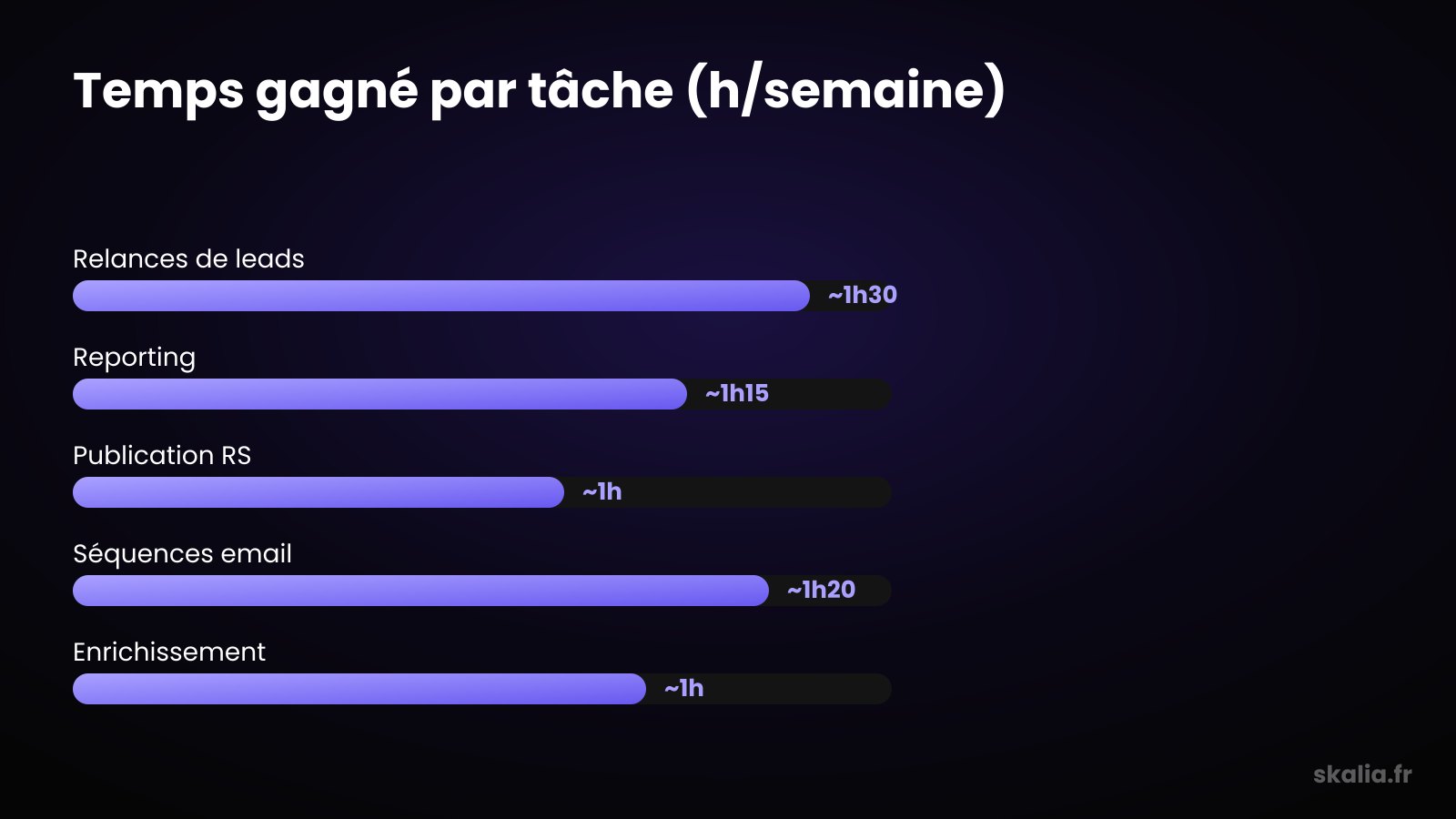
The go-to tool: a CRM with workflows (HubSpot, Pipedrive) or a no-code connector (Make, n8n). The trigger: a new lead or no response after 3 days. The payoff: about 1.5 hours a week, and above all, leads that no longer fall through the cracks.
2. Weekly reporting
Automate the compilation of your numbers instead of rebuilding the same table every Monday. Cost per lead, traffic, conversion rate: this data already sits in Google Ads, Analytics, or your CRM. A connector pulls it together into a dashboard or a report sent automatically.
The go-to tool: Looker Studio connected to your sources, or a Make scenario that pushes a recap to Slack every Monday morning. The payoff: about 1 hour 15 minutes a week. Bonus: you eliminate the copy-paste errors that skew decisions.
3. Social media publishing
Schedule and publish your content in one batch instead of drip-feeding it throughout the week. Manually adapting a post for LinkedIn, Instagram, and Facebook several times a week costs a lot of back-and-forth time. A scheduling tool plans everything in advance from a single screen.
The go-to tool: Buffer, Metricool, or Publer for multi-network scheduling. The payoff: about 1 hour a week, plus a publishing consistency that no longer depends on your calendar. And consistency is exactly what the algorithms reward.
4. Nurturing email sequences
Let an automated sequence nurture your prospects while you sell. A prospect who isn't ready yet needs several touchpoints before buying. Sending these emails by hand is impossible to sustain. A scheduled sequence triggers the right messages at the right time.
The go-to tool: an email tool with workflows (Brevo, ActiveCampaign) or a cold email platform. The payoff: about 1 hour 20 minutes a week. The sequence runs around the clock and converts without any intervention. To go further on orchestration, see our guide to automated prospecting.
5. Contact enrichment
Automate the collection of missing data on your contacts instead of digging by hand. An email address alone isn't enough to personalize outreach: you need the job title, the company, the industry. An enrichment tool fills in these fields automatically as soon as a contact enters your database.
The go-to tool: an enrichment service (Dropcontact, Clearbit) connected to your CRM through a no-code scenario. The payoff: about 1 hour a week, plus clean records that make all your other automations more relevant.
6. Lead qualification
Automate the sorting of your leads so you only work the hottest ones. Not all contacts are equal, and qualifying by hand wastes time on prospects outside your target. A scoring system rates each lead against criteria and routes the best ones to a sales rep.
The go-to tool: a CRM's lead scoring feature, or a qualification AI agent that asks the first few questions. The payoff: about 45 minutes to 1 hour a week, and above all, sales time focused on the right deals.
7. Competitive and industry monitoring
Automate your monitoring so the information comes to you instead of you having to chase it. Tracking competitors, keywords, and trends by hand is time-consuming and quickly abandoned. Alerts and consolidated feeds deliver the essentials in one place, at a regular interval.
The go-to tool: Google Alerts, an aggregated RSS feed, or a no-code scenario that summarizes updates with AI. The payoff: about 45 minutes a week. You stay informed without thinking about it, and you react faster than the competition.
How much time can you really save?
Add up the seven tasks and an SME commonly reclaims 6 to 8 hours a week — a full day. The gain isn't theoretical: each automated task removes a gesture repeated several times a week. The table below summarizes the project, the go-to tool, and the time freed up.
| Task | Go-to tool | Time saved/week |
|---|---|---|
| Lead follow-ups | CRM + workflows (HubSpot, Pipedrive) | ~1h30 |
| Weekly reporting | Looker Studio, Make | ~1h15 |
| Social media publishing | Buffer, Metricool, Publer | ~1h |
| Email sequences | Brevo, ActiveCampaign | ~1h20 |
| Contact enrichment | Dropcontact, Clearbit | ~1h |
| Lead qualification | CRM lead scoring, AI agent | ~45 min to 1h |
| Monitoring | Google Alerts, RSS, AI scenario | ~45 min |
These ranges apply to an SME team with moderate volume. The higher your volumes, the bigger the payoff. Conversely, don't automate a task you only do twice a year: the setup time would never pay off.
What tools can you use to automate without coding?
Most of these automations can be built with a no-code tool, no developer required. Three platforms cover most of an SME's needs: Zapier for simplicity, Make for advanced visual scenarios, and n8n for self-hosting and cost control. They connect your tools to each other through triggers and actions.
The principle is always the same: an event triggers a sequence of actions. A new lead comes in, gets enriched, scored, added to the CRM, then followed up. You assemble the building blocks once, and the scenario then runs on its own. For tasks that require judgment (qualifying, summarizing monitoring feeds), an AI layer sits on top, just like an AI agent in customer service.
The practical advice: don't try to automate everything at once. Pick the most painful task, build the scenario, measure the time saved over two weeks, then move on to the next one. That's how you build a full day of time saved, without creating a Frankenstein of a system.
FAQ
Do you need to know how to code to automate your marketing?
No, the vast majority of marketing automations can be built without code. Tools like Zapier, Make, or n8n work through drag-and-drop and ready-made connectors. You describe a trigger and a set of actions, without writing a single line of code. Code is only useful for very specific edge cases.
Which task should you start with?
Start with the most frequent and most mechanical task: often lead follow-ups or weekly reporting. These are quick wins, easy to set up, that prove the value of automation within a few days. Once that first scenario pays off, expand task by task.
Will automation make my marketing impersonal?
No, as long as you automate the mechanical action and keep control of the message. An automated follow-up can stay personalized thanks to data enrichment. AI is there to sort and prepare, not to decide on your behalf. The goal is to free up time for the exchanges that truly matter.
How much do these tools cost for an SME?
Most offer an entry-level plan between €20 and €100/month depending on volume. A no-code tool like Make starts around €10/month, a CRM with workflows between €30 and €90/month. The return on investment is quick as soon as you reclaim several hours a week.
Where to start with Skalia?
At Skalia, we help SMEs identify the marketing tasks worth automating, then build scenarios that hold up over time. The goal is never automation for its own sake, but the time and leads it recovers. We start from your real processes, not from an overengineered setup. If you don't know where to begin, our guide AI marketing: where to start is the right first step. Got a task that's eating up your weeks? Let's talk about it.