
 kevin@skalia.ca


Cold Email: The Complete 2026 Guide (Deliverability, Messaging, Legality)
Cold email means sending prospecting emails to professionals who don't yet know you. It's the most scalable channel in B2B (1,000 to 2,000 contacts per month), and it's legal in France under certain conditions. But it's also the most technically demanding: without properly preparing your domain, your emails end up in spam before anyone reads them. Here's the complete guide.
- Cold email is legal in B2B (under the CNIL framework: relevance to the recipient's role, clear sender identification, opt-out).
- 80% of failures come down to technical setup: a dedicated domain, SPF/DKIM/DMARC, and 3 to 4 weeks of warm-up are non-negotiable.
- A good cold email is under 100 words and asks a question.
- Realistic reply rate: 1 to 5%, offset by volume.
What Is Cold Email (and Why It Still Works)
Cold email is the practice of sending prospecting emails to professionals you have no prior relationship with. Unlike LinkedIn, it doesn't depend on any platform and scales easily: 1,000 to 2,000 prospects contacted per month, versus 300 to 400 on LinkedIn.
Its effectiveness often surprises people: Backlinko's study (12 million emails analyzed) measures under 9% replies on average, but that figure blends the worst campaigns with the best. A well-targeted, well-written, and technically clean campaign reaches 3 to 8% replies, which, across 1,500 monthly sends, means 45 to 120 conversations. Within a system of automated multichannel prospecting, email complements LinkedIn by catching the prospects the first channel missed.
Why Do Your Emails End Up in Spam?
Because deliverability is built before you send a single email. Spam filters judge your domain, not your message. Here's the technical checklist you can't skip.
| Element | Role | Practical rule |
|---|---|---|
| Dedicated sending domain | Protect your main domain | Prospect from a lookalike domain (e.g., skalia-contact.fr), never from your primary domain |
| SPF, DKIM, DMARC | Authenticate your emails | All 3 DNS records must be valid before any send |
| Domain warm-up | Build sender reputation | 3 to 4 weeks of gradually increasing sends before your first campaign |
| Volume per inbox | Stay under the radar | 30 to 50 emails per day per inbox, multiple inboxes if needed |
| List cleaning | Avoid bounces | Verify every address (bounce rate under 3%) |
Neglecting just one of these elements is enough to send your entire campaign to spam, and a burned domain reputation takes months to rebuild.
SPF, DKIM, DMARC: What Does Each Acronym Actually Do?
These three DNS records answer the only question Gmail and Outlook ask before reading your message: does this email really come from you? SPF publishes the list of servers authorized to send email on behalf of your domain, and any message sent from a server not on that list becomes immediately suspect. DKIM attaches a cryptographic signature to every email: if the content is altered in transit, the signature no longer matches and the message gets discarded. DMARC tells mail providers what to do when SPF or DKIM fails (let it through, quarantine it, or reject it) and sends you reports to spot anomalies.
Since February 2024, Gmail and Yahoo have required all three authentications for bulk senders, and in practice enforce them for everyone. Google's official guidelines for senders put it bluntly: without full authentication, your emails get filtered before their content is even analyzed.
Checking that everything is in place takes two minutes. Send an email from your prospecting inbox to a Gmail address, open the received message, then click "Show original": all three lines — SPF, DKIM, and DMARC — should read PASS. A single FAIL means you fix it before sending anything else, not after.
How Does Warm-Up Work, and Why Is It Mandatory?
Warm-up means sending a gradually increasing volume of emails over 3 to 4 weeks to build the reputation of a new domain. A domain created yesterday that fires off 200 emails on day one behaves exactly like a spammer, and filters treat it as one. Warm-up instead simulates human activity: about ten emails a day the first week, then 20, then 30, up to a cruising pace of 20 to 50 emails per day per inbox.
Warm-up tools, built into most cold email software, automate this work: they exchange messages with a network of partner inboxes, open them, reply to them, and pull them out of the spam folder when needed. These positive signals tell mail providers your domain is trustworthy.
Why Use a Secondary Domain Dedicated to Prospecting?
Because sender reputation can deteriorate, and that risk should never touch the domain that carries your client communications, invoices, and software logins. Standard practice: buy a lookalike domain (skalia-contact.fr for skalia.fr), redirect it to your main site to reassure prospects who check, set up 2 to 4 sending inboxes on it, then configure SPF, DKIM, and DMARC. If this domain ends up blacklisted despite your precautions, you replace it for a few dozen euros — your main domain stays untouched.
What Thresholds Should You Monitor Once a Campaign Is Live?
Two metrics determine your reputation: the bounce rate (emails rejected because the address doesn't exist or no longer exists), which should stay under 2%, and the spam complaint rate, which should stay under 0.1% — one complaint per 1,000 sends.
| Metric | Alert threshold | Immediate action |
|---|---|---|
| Bounce rate | Above 2% | Pause the campaign and re-verify every address with a validation tool |
| Spam complaints | Above 0.1% | Narrow your targeting and soften your message: you're writing to the wrong people |
| Open rate | Below 40% | Suspect a deliverability issue rather than a subject line problem: retest SPF, DKIM, DMARC |
A high bounce rate is almost always a list quality problem. That's the main reason to be wary of purchased lists: an unverified database sends these metrics through the roof within days, on top of the compliance questions detailed in our article on buying email databases.
How Do You Write a Cold Email That Gets Replies?
The golden rule: under 100 words, one single topic, one single question. The framework that performs has remained remarkably stable.
- Subject line: 2 to 5 words, factual, no clickbait capitals or emoji. Subject lines that read like an internal note ("quick question," "sales team") consistently outperform.
- Opening line: one sentence about the prospect, not about you. A precise observation about their company proves the email wasn't blasted to 10,000 people.
- Offer: one sentence connecting their pain point to what you do, with a number if possible.
- Call to action: a low-commitment closed question ("is this something you're dealing with right now?") rather than an immediate meeting request.
Plan for 2 to 3 follow-ups spaced 4 to 7 days apart: they often generate half of the campaign's total replies.
Anatomy of a Cold Email That Gets Replies, Line by Line
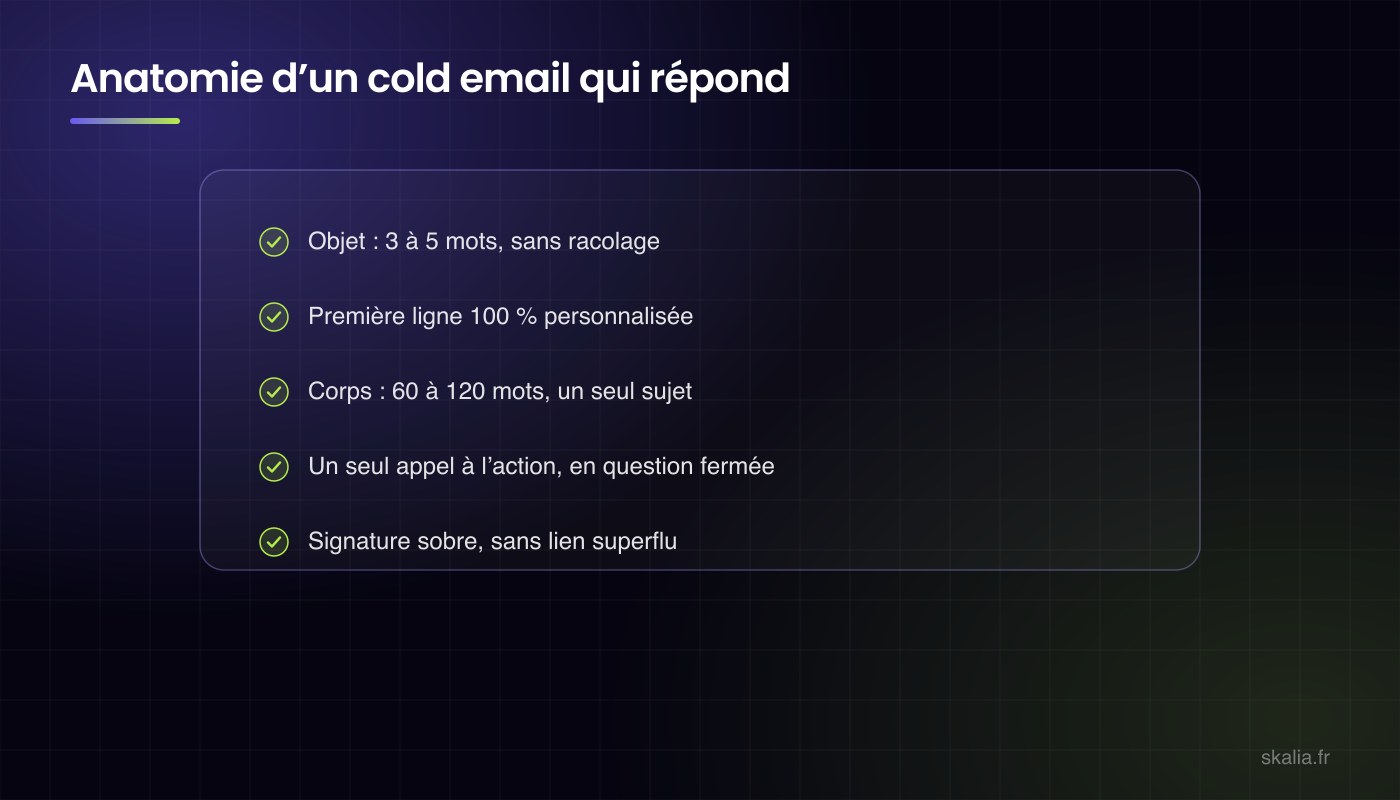
An effective cold email comes down to five elements: a 3-to-5-word subject line, an opening line written for this specific prospect, a 60-to-120-word body, a single closed question, and a clean signature. Here's a full example, followed by a breakdown of what makes each line work.
Subject: vendor invoices
Hi Claire,
I noticed you just hired a second accountant — that's usually the point where vendor invoice processing starts piling up.
We help industrial SMEs automate that data entry. Our clients recover an average of one full day per week on this task.
Is this something you're dealing with right now?
Paul Martin, Facturio
Prefer not to hear from me again? Reply "stop" and I'll remove you from my list.
The Subject Line: 3 to 5 Words, No Clickbait Capitals
"Vendor invoices" reads like an internal note, not an ad, and that's exactly the effect you want. The subject line should make people want to open the email without promising anything. Ban capital letters, emoji, "URGENT," and numeric promises in the subject: these are the markers both filters and humans associate with spam.
The Opening Line: A Verifiable Fact About the Prospect
Hiring an accountant is a specific fact, found on LinkedIn in thirty seconds. This line proves the email wasn't sent to 10,000 people, and it's also what shows up as a preview in the inbox, right after the subject line. So it does double duty.
The Body: 60 to 120 Words, One Pain Point, One Proof Point
Two sentences are enough: what you do, connected to the pain point you spotted, then a concrete proof point ("one day per week"). No company overview, no feature list, no attachment.
The Call to Action: One Closed Question, Low Commitment
"Is this something you're dealing with right now?" can be answered in ten seconds, with a yes or no. "Are you available Tuesday at 2 p.m. for a 30-minute call?" asks for ten times more commitment from someone who doesn't know you yet. The meeting request comes at the second or third touch.
The Signature and Opt-Out: Simple and Mandatory
First name, last name, company, maybe a link to your site. No image banner, no collection of links: every extra element adds weight to the message and raises the risk of filtering. The unsubscribe line, on the other hand, isn't optional: it's one of the three conditions set by the legal framework, detailed in our article on cold email legality.
What Volume Should You Send, and at What Pace?
Start low and ramp up gradually: 20 to 30 emails a day during the first week of the campaign, then 40 to 50 per inbox at cruising speed. To go beyond 1,000 monthly sends, add more sending inboxes (2 to 4 inboxes on the dedicated domain) rather than overloading a single one. That way, every inbox keeps behaving like a human, not a bot.
What Follow-Up Sequence Should You Use, and When Do You Stop?
A typical sequence has 3 to 4 emails spread over two to three weeks, on a Day 0, Day 3, Day 7, then Day 14 rhythm. Beyond the fourth message without a reply, each additional follow-up returns less and less while raising the risk of a complaint — that's when you stop.
| Step | Timing | Content |
|---|---|---|
| Initial email | Day 0 | Personalized observation, offer, closed question |
| Follow-up 1 | Day 3 | Two sentences in the same thread: resurface the initial email, ask the question again |
| Follow-up 2 | Day 7 | A fresh angle: case study, industry stat, useful resource |
| Follow-up 3 | Day 14 | Closing message: you won't push further, the door stays open |
Two execution rules. The Day 3 follow-up is sent as a reply to the first email, so the full thread stays visible, and it fits in two sentences: "Hi Claire, did you get a chance to see my message? Is the vendor invoice topic on your radar?" The Day 7 follow-up, meanwhile, needs to bring something new: a comparable client case, useful content, an industry statistic. A follow-up that just asks for a reply ("just following up") spends your credibility without offering anything in return.
The Day 14 closing message is surprisingly effective: announcing that you're stopping the follow-ups often triggers a reply, even if it's just a "not now, check back next quarter" — which is gold for your pipeline. And the moment you get a negative reply or an unsubscribe request, the rule is absolute: immediate, permanent removal from the sequence.
What About Going Multichannel With LinkedIn?
Email and LinkedIn reinforce each other when they're interleaved in the same sequence: profile visit on Day 1, connection request on Day 5, LinkedIn message on Day 10 for prospects who haven't opened any email. The prospect sees your name across two channels, familiarity builds, and combined reply rates beat either channel alone, as shown in our email and LinkedIn reply rate benchmarks. That said, reserve this setup for targets genuinely active on LinkedIn: for everyone else, a clean 4-email sequence is more cost-effective than a half-relevant multichannel push.
Is Cold Email Legal in France?
Yes, in B2B, under three conditions set by the CNIL (France's data protection authority): the message must relate to the recipient's professional role, your identity must be clear (no masked sender), and every email must offer a simple way to opt out of future contact. In B2C, the rule flips: prior consent is mandatory, which rules out cold email entirely. As for buying databases, caution is essential: an unverified list wrecks your deliverability on top of raising compliance concerns.
Key Takeaways
- Technical setup first: dedicated domain, valid SPF/DKIM/DMARC, and 3 to 4 weeks of warm-up before your first send.
- Under 100 words, an observation about the prospect, a simple question: the copywriting that gets replies.
- 30 to 50 emails per day per inbox; volume comes from the number of inboxes, not the pace.
- 1 to 5% replies is normal: cold email is a game of volume and consistency.
- Legal in B2B under the CNIL framework: relevance to the recipient's role, identification, opt-out.
FAQ: Cold Email
How Long Does It Take to Warm Up a Domain?
Plan for 3 to 4 weeks of gradually increasing sends (via a warm-up tool) before launching a real campaign. Skipping this step is the number one cause of failure.
What Reply Rate Counts as Good?
Above 3%, your campaign is working. Above 6%, it's excellent. Below 1%, stop and fix your targeting or messaging before continuing.
Can I Prospect From My Usual Email Address?
No. A deliverability incident would penalize all your emails, including the ones going to your clients. Always use a dedicated sending domain.
Where Do I Find My Prospects' Email Addresses?
Through enrichment tools (Apollo, Kaspr, Lusha, etc.) that find and verify professional addresses from LinkedIn profiles. Always verify each address before sending.
Cold Email or LinkedIn: Where Should You Start?
LinkedIn if your target audience is active there (faster results), email if you're aiming for volume. Combining both, orchestrated into multichannel sequences, remains the top-performing option: it's the core of our AI-powered automated prospecting offer.
Written by Kevin Sazarin, Growth Marketer and founder of Skalia (Toulouse). Parent guide: automated prospecting from A to Z. See also: LinkedIn prospecting.