 kevin@skalia.ca
LinkedIn Prospecting: The Complete 2026 Method (Targeting, Messaging, Quotas)
LinkedIn prospecting means identifying your ideal clients on the platform, then sending them personalized connection requests and messages to open a sales conversation. Done well, it gets 10 to 25% replies — 3 to 10 times more than cold email. Here's the complete method: targeting, messaging, quotas, and automation.
- LinkedIn is the B2B channel with the best reply rate (10 to 25% when done well).
- Sales Navigator targeting drives 50% of the result, the message 30%, the tool 20%.
- Stay under 20 to 30 connection requests a day to protect your account.
- Automation is possible and effective, as long as you respect the quotas and step in personally the moment a prospect replies.
Why Is LinkedIn the #1 Channel for B2B Prospecting?
Because your prospects are already there, with their job title on display and their professional activity visible. According to LinkedIn, 80% of B2B leads generated on social media come from the platform, and a LinkedIn message gets on average 3 times more replies than an equivalent cold email.
The other advantage is structural: unlike email, LinkedIn shows your face, your background, and your content before the prospect even replies. A polished profile acts as a silent sales page. It's the first channel we activate in our automated prospecting system.
How Do You Optimize Your LinkedIn Profile Before Prospecting?
Your profile is the first thing a prospect checks before accepting your connection request: if it reads like a résumé, your acceptance rate caps out no matter what message you send. The prospect spends less than 30 seconds on your page and looks at six specific elements. Go through them before launching any campaign.
A Photo and Banner That Build Trust
Choose a recent photo, framed on your face, with a neutral background and an open expression. No vacation photos, no company logo standing in for your face: the prospect wants to see who they're talking to. The banner completes the message with a line summing up your promise and, if possible, a proof point: a client result, the number of companies you've helped, the industry you serve.
A Client-Focused Headline, Not a Job Title
"Sales Director at X" tells the prospect nothing. An effective headline answers the question they're actually asking: what can this person do for me? Frame it in one line: who you help, plus the result you deliver. A structure that works: "I help [target audience] achieve [result] without [pain point]." This headline shows up under your name in every connection request, message, and comment — it's your most-read piece of copy on LinkedIn.
An About Section Written Like a Sales Page
The first three lines display without clicking "see more": they need to name your target audience and their problem. Follow up with your method in a few bullet points, a proof point or client case, then an easy way to reach you. Write speaking directly to the reader, not in the third person: the prospect should read a pitch, not a biography.
A Featured Section That Proves Your Results
The Featured section — the content pinned at the top of your profile — is your sales window. Pin two to four items: a client case with numbers, your best post, a booking page. A hesitant prospect will look there for proof that you can deliver what your headline promises.
Recent Client Recommendations
Three client recommendations from the past year beat fifteen colleague recommendations from 2019. Ask for one from every satisfied client, suggesting they mention the result achieved. It's the LinkedIn equivalent of a Google review: prospects read these before replying.
Visible Activity Within the Last 30 Days
A profile that's been silent for six months raises a doubt: is this account active, or reactivated purely to sell? Before prospecting, comment on a few posts in your industry and publish at least one piece of content. Your activity tab should show a living, breathing professional. This ties into the light social selling covered below.
One afternoon is enough to handle these six points. It's the highest-return investment in the whole method: every point of acceptance you gain carries through the entire campaign, request after request.
How Do You Build Targeting That Gets Replies?
Targeting drives half the result. A good list is built with LinkedIn Sales Navigator (about €100/month) and three priority filters: the decision-maker's exact role (not "executive" but "accounting firm manager"), a company size that fits your offer, and the geographic area if your service is local.
Two golden rules follow. First, aim for 300 to 500 prospects per campaign: below that, you don't have enough data to optimize; above it, the message inevitably becomes generic. Second, exclude inactive profiles: a prospect with no photo and no recent activity won't reply, no matter your message.
What Messages Should You Send (and Which Should You Avoid)?
The principle: the first message should get a reply, not make a sale. The sequences that work follow a simple 3-to-4-step pattern.
- Connection request: short, with no sales pitch. A bare request, or one with a single line of context, outperforms a pitch.
- Message 1 (after acceptance): a personalized observation about the prospect's company + an open question tied to their pain point. Zero links, zero brochure.
- Follow-up 1 (4 to 6 days later): a different angle — a stat or a short client case, for example.
- Follow-up 2 (7 days later): the "breakup message," brief and pressure-free, which often gets the sequence's best reply rate.
Avoid at all costs: the 15-line wall of text introducing your company, the pitch right in the connection request, and mass-generated fake flattery ("I was impressed by your background") that everyone recognizes instantly.
What Does a 4-Step Sequence Over 3 Weeks Look Like?
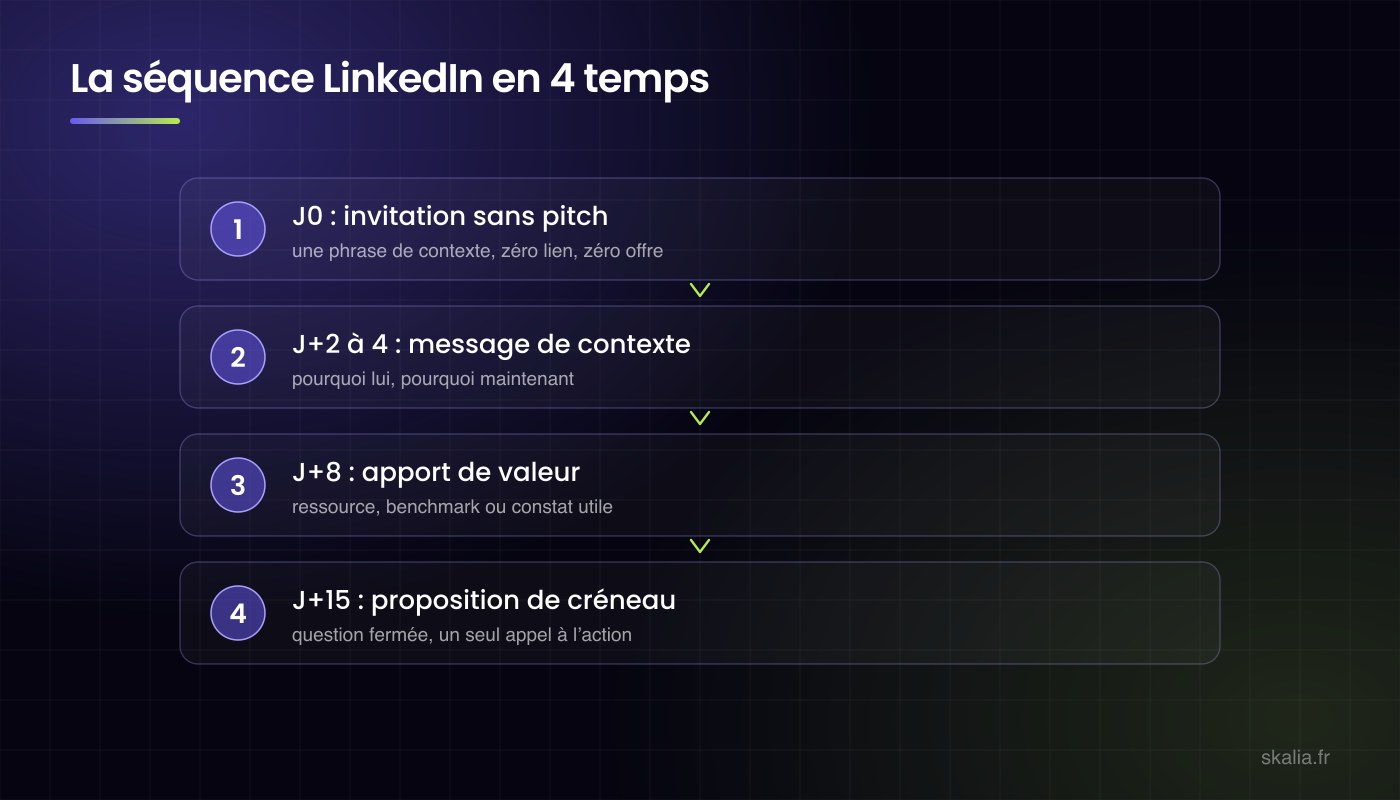
Here's a typical sequence, to adapt to your audience: four touchpoints spread over roughly three weeks, each with a distinct role.
| Touchpoint | Timing | Message's role |
|---|---|---|
| 1. Connection request | Day 0 | Get the connection, nothing else |
| 2. Context message | 2 to 3 days after acceptance | Open the conversation around their pain point |
| 3. Value add | 5 to 6 days after message 2 | Give before asking |
| 4. Meeting proposal | 6 to 7 days after message 3 | Convert interest into a meeting |
The logic behind each step:
- The connection request (Day 0): bare, or with one factual line of context, like "we follow the same topics" or a reference to their recent post. No pitch: the only goal is acceptance.
- The context message (2 to 3 days after acceptance): a brief thank-you, then an open question tied to an observable pain point — hiring in progress, a new office opening, a recent promotion. Three to four lines max, zero links.
- The value add (around Day 10): share something useful without asking for anything: an industry stat, a comparable client case summed up in two lines, a relevant resource. This message recovers a good share of the silence left by the previous one.
- The meeting proposal (around Day 17): short and direct, along the lines of "is this worth a 20-minute conversation?", with two time slots suggested. It's the only message in the sequence that asks the prospect for something.
Send every touchpoint during business hours, never on weekends: replies mostly come in Tuesday through Thursday.
If there's silence after the fourth touchpoint, stop the sequence: pushing further hurts your account and your image. Two options remain open: move the prospect to an email sequence, as detailed in our cold email guide, or reach out again in 2 to 3 months with a fresh angle. If more than 9 out of 10 conversations go silent, the problem is your targeting or your messaging: we list the causes in why your LinkedIn messages go unanswered.
What Quotas Should You Respect to Protect Your Account?
LinkedIn restricts accounts that send too much, too fast. The caps evolve, but here are the cautious orders of magnitude observed in 2026.
| Action | Safe daily limit | Safe weekly limit |
|---|---|---|
| Connection requests | 20 to 30 | 100 to 150 |
| Messages to connections | 30 to 50 | 200 to 250 |
| Profile visits | 80 to 100 | 500 |
| InMails (Sales Navigator) | 5 to 10 | 50 (depending on credits) |
Three practices further reduce the risk: spread sends throughout the day (never in bursts), ramp up volume gradually over 2 to 3 weeks on a low-activity account, and keep your connection acceptance rate above 30% (below that, your targeting is off and LinkedIn notices).
Should You Automate Your LinkedIn Prospecting?
Yes for execution, no for the conversation. Automation handles connection requests, sequences, and follow-ups at calibrated times perfectly; it frees up 5 to 10 hours a week. But the moment a prospect replies, a human needs to take over: automated replies are spotted instantly and burn the relationship.
If you'd rather hand off the whole thing — targeting, copywriting, sending, sorting replies — that's exactly what our AI-powered automated prospecting offer covers (free audit, response within 24 hours), or start by reading how to choose a B2B prospecting agency.
How Long Before Your First Meetings?
Plan for 1 to 2 weeks for the first replies and 2 to 3 weeks for the first qualified meetings, as the sequences run through their follow-ups. Exact volumes depend on your industry: we break them down with figures in how many leads to expect from a LinkedIn campaign.
Should You Publish Content to Support Your Prospecting?
Yes, but sparingly: two posts a month are enough to turn your profile into a sales asset, without becoming a full-time content creator. That's the principle of light social selling, an approach LinkedIn itself documents on LinkedIn for Business: publish just enough so that a prospect checking your profile finds a credible, active professional.
Why Two Posts a Month Are Enough
Because your posts aren't there to generate leads directly: they serve as proof at the moment a prospect visits your profile before accepting your connection request. For that purpose, two solid pieces of content a month do the job. Posting daily to prospect confuses two different jobs: outbound prospecting fills your calendar within the next few weeks, while content builds awareness over months. Keep up two posts a month for a full quarter rather than ten posts in January and nothing after.
What Formats Work in B2B?
- The results-based case study: what you did for a client, the result achieved, the lesson learned.
- The opinionated take on an industry practice: a clear stance sparks more conversations than a neutral summary.
- Short educational content: a five-point method, a common mistake and its fix.
- The PDF document or carousel: well suited to step-by-step methods, it holds attention longer than plain text.
Avoid inspirational quotes and shares with no commentary: they offer a prospect evaluating you zero proof of competence.
How Posting Improves Your Acceptance Rate
The mechanism is simple: between two identical connection requests, the prospect accepts the one from the profile showing recent activity and content tied to their problem. An active account more easily stays above the healthy 25 to 35% acceptance threshold, whereas a dormant profile stalls below it, with the restriction risks that implies. Your posts also feed the prospecting itself: a prospect who liked or commented on one of your posts is a priority signal to reach out to. For more on the channel's overall effectiveness in 2026, read does LinkedIn prospecting still work.
Key Takeaways
- LinkedIn offers the best reply rate in B2B: 10 to 25% with good targeting and good messaging.
- Sales Navigator is the highest-return investment in the stack: targeting drives 50% of the result.
- First message = open a conversation. A sales pitch in the connection request kills the campaign.
- Safe quotas: 20 to 30 connection requests and 30 to 50 messages a day, ramped up gradually.
- Automate execution, never the conversation.
FAQ: LinkedIn Prospecting
Is Sales Navigator Essential?
Strongly recommended, yes. Its filters (role, company size, tenure, recent activity) enable targeting that's impossible with a free account. At about €100/month, it pays for itself with your first signed client.
How Many Messages Can I Send Per Day Without Risk?
Stay under 20 to 30 connection requests and 30 to 50 messages a day, spread across the day, ramping up gradually if your account is prospecting for the first time.
What Happens If LinkedIn Restricts My Account?
The first restriction temporarily limits connection requests (a few days to a few weeks). A repeat offense can get the account suspended. Hence the importance of quotas and tools that respect them natively.
InMail or a Regular Message: Which Should You Use?
A regular message after accepting a connection request remains more effective and free. InMail serves as a backup channel for prospects who don't accept the request.
Does LinkedIn Prospecting Work in Every Industry?
It excels wherever decision-makers are active on the platform: B2B services, tech, industry, consulting, finance. It's less effective at reaching tradespeople or shopkeepers with little presence on LinkedIn; email and advertising then take over.
Written by Kevin Sazarin, Growth Marketer and founder of Skalia (Toulouse). Parent guide: automated prospecting from A to Z.